> For the complete documentation index, see [llms.txt](https://reference-guide.gitbook.io/prop-trading-version-release-notes/llms.txt). Markdown versions of documentation pages are available by appending `.md` to page URLs; this page is available as [Markdown](https://reference-guide.gitbook.io/prop-trading-version-release-notes/v7.48.0-enhanced-prop-challenge-risk-controls.md).
# V7.48.0 – Enhanced Prop Challenge Risk Controls
*Stay ahead with our latest Prop Trading System updates—discover all the new features here!*
**Released Date - 28 June 2025**
This update gives you greater flexibility and precision in managing risk for your prop challenges. You can now choose how "Max Daily Loss" is calculated and monitored:
* **Daily Settlement Method** – Calculates Max Daily Loss once per day based on both closed and open trades.
* **Dynamic Method** – If Daily Settlement is disabled, the system checks equity every 10 minutes and compares it against the loss threshold.
### Key Function Highlights
1. [**Toggle Daily Settlement**](#id-1-toggle-daily-settlement)**:** Enable or disable the once-per-day Max Daily Loss calculation (based on closed + open trades). When disabled, monitoring is done dynamically via 10-minute equity checks.
2. [**Fortex Max Daily Drawdown Control**](#id-2-fortex-max-daily-drawdown-control)**:** Enable or disable Fortex’s "Max Daily Drawdown" calculations to match your preferred challenge time zone, ensuring risk evaluations stay consistent and precise.
### 1) Toggle Daily Settlement
The CRM calculates the **Maximum Daily Loss** using two methods:
* **Dynamic Monitoring**: Equity is updated and checked every 10 minutes to track daily loss.
* **Daily Settlement**: At 00:00 (Challenge Time Zone), the system calculates daily profit and loss based on closed trades and the floating P/L of open positions.
You now have the option to disable **Daily Settlement** logic for your Prop Challenge. This is useful if your traders are allowed to hold overnight positions and you do not want floating P/L to affect their daily loss evaluation.
To disable Daily Settlement, follow these steps:
{% stepper %}
{% step %}
#### Access the Prop Challenge Settings
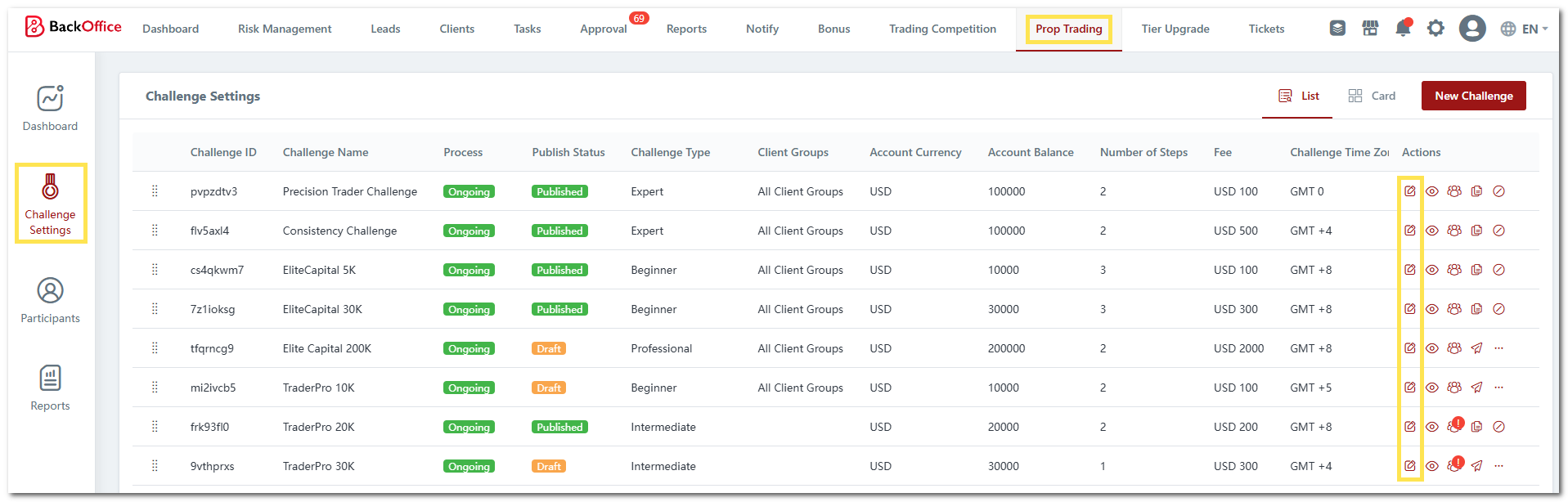
1. Navigate to **"Prop Trading"** > **"Challenge Settings"**.
2. Locate the challenge you wish to modify and click the **"Edit"** icon.
{% endstep %}
{% step %}
#### Configure Daily Loss Calculation Rule Settings
1. Go to the **"Challenge Rule"** tab.
2. Under **Maximum Daily Loss Calculation Rule Settings**, untick the **Daily Settlement** option.
3. Note: **Dynamic Monitoring** is always enabled and cannot be unticked.
4. Click **"SAVE AND EXIT"**.
{% endstep %}
{% step %}
#### Publish the Challenge
1. Click the **"Review and Publish"** icon.
2. Review your changes and click **"Publish Now"**.
3. Your challenge will now apply only the **Dynamic Monitoring** method for max daily loss.
4. **Note:**
* If the challenge is already running, daily settlement will no longer occur from the next 00:00 cycle.
* If you re-enable it later, daily settlement will resume at the next 00:00.
{% endstep %}
{% endstepper %}
### **2) Fortex Max Daily Drawdown Control**
A new toggle gives you flexibility to enable or disable Fortex’s max daily drawdown calculation, allowing risk monitoring to align with your preferred challenge time zone and maintain consistent loss evaluation.
Previously, the max daily loss set for your prop challenge would automatically apply to Fortex’s max daily drawdown setting. Now, you can remove this link—allowing your daily loss rules to follow the challenge time zone without Fortex applying its own separate calculation.
{% hint style="info" %}
*This applies only to prop brokers or prop clients using the Fortex trading platform.*
{% endhint %}
To configure this setting, follow these steps:
{% stepper %}
{% step %}
#### Access the Prop Challenge Settings
1. Navigate to **"Prop Trading"**.
2. Go to the **"Challenge Settings"** menu.
{% endstep %}
{% step %}
#### Amend Fortex Settings
1. Locate the challenge you want to update.
2. Click the **"..."** icon and select **"Fortex Settings"**.
3. Under **Risk Settings**, uncheck "**Enable Max Daily Drawdown"**.
4. Click **"Save"**.\
\

5. New participants in your challenge will no longer have the Max Daily Drawdown applied on their Fortex accounts.
{% endstep %}
{% endstepper %}
To update this setting for existing participants:
{% stepper %}
{% step %}
#### Go to the Fortex Account
1. Navigate to **"Trading Accounts"**.
2. Locate the account you want to amend and click the **"View"** icon.
{% endstep %}
{% step %}
#### Amend Fortex Settings
1. Click the **"Edit"** icon.
2. Edit the **Max Daily Drawdown** field.
3. Set the value to **0**.
4. Click the **"Save"** icon.
{% endstep %}
{% endstepper %}