> For the complete documentation index, see [llms.txt](https://reference-guide.gitbook.io/crm-back-office-user-guide-full/llms.txt). Markdown versions of documentation pages are available by appending `.md` to page URLs; this page is available as [Markdown](https://reference-guide.gitbook.io/crm-back-office-user-guide-full/crm-back-office-user-guide-full-cn/17.-settings/client-portal-login-registration-settings/registration-process-settings.md).
# Registration Process Settings
You have the ability to customize the registration process settings according to your business and client preferences. Depending on your desired approach, you can configure the registration process to align with either a fast and simple registration or a comprehensive one-stop solution for clients.
For a fast and simple registration, you can choose to include only the registration form in the process. This allows clients to quickly provide the necessary information and complete the registration without additional steps.
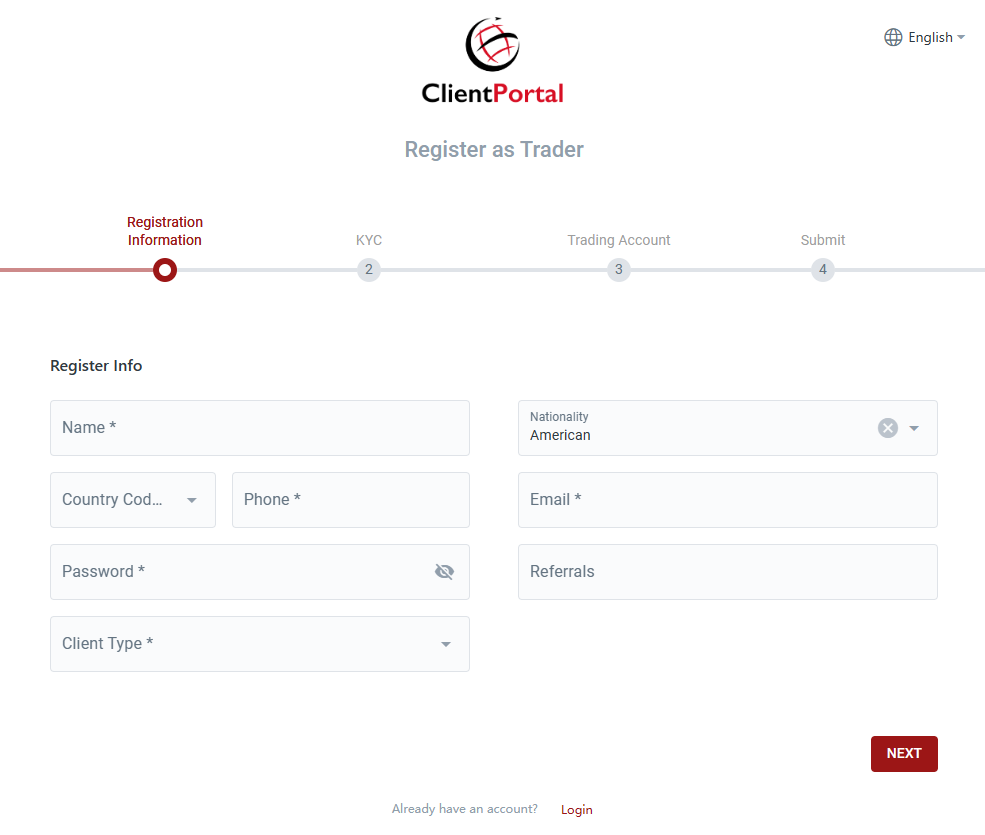
On the other hand, if you prefer a one-stop registration process that enables clients to immediately start trading upon completion, you can opt to include the KYC form and the trading account request alongside the registration form. This streamlines the process by allowing clients to submit all relevant information in a single step, expediting the account creation and trading initiation.
### Setting Up Registration Process
To set up the registration process, follow these steps:
1. Navigate to the Login/Registration Method section.
2. Click on the Edit icon.
3. Select the desired steps to include in the registration process:
* Registration Information: This step includes the mandatory registration form that clients need to fill in.
* Fill in KYC information during registration: This step requires clients to provide their KYC information during the registration process.
* Create an account during registration: This step requires clients to submit a trading account request while completing the registration.
4. Click on the Save button to save your changes.
### Application
1. Enabling only the "Registration Information" step means that clients only need to fill in the registration form to register an account. \

2. In a multi-step registration process with KYC or trading account creation, clients can see the required steps for completing their account registration.